What happens in the event of an outage? How can I prepare for an outage?
When a grid outage occurs, Base will send you a push notification via the Base Power App to inform you that your battery is backing up your home.
To ensure you receive all outage alerts, download the Base Power app and turn on push notifications to get outage alerts and track your power source, energy usage, battery status, and expected battery life.
If the outage lasts for an extended period and your battery level starts to decline, Base will send push notifications with tips to extend battery life—such as turning off your A/C, electric furnace, and other non-essential appliances.
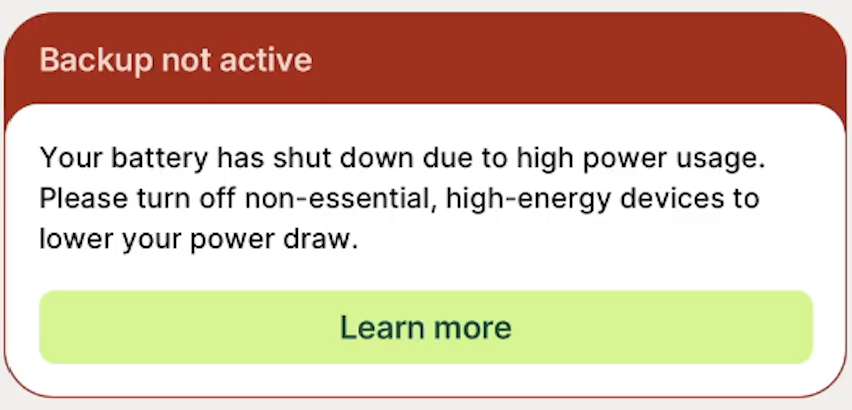
If your battery does not automatically kick-in as it should, this usually means high-energy appliances are using too much power. Your home must be using 11 kW or less for the battery to turn on. If high-draw devices like electric heaters push usage higher, you'll need to reduce usage before the battery can turn on. The system will automatically try to restart three times.
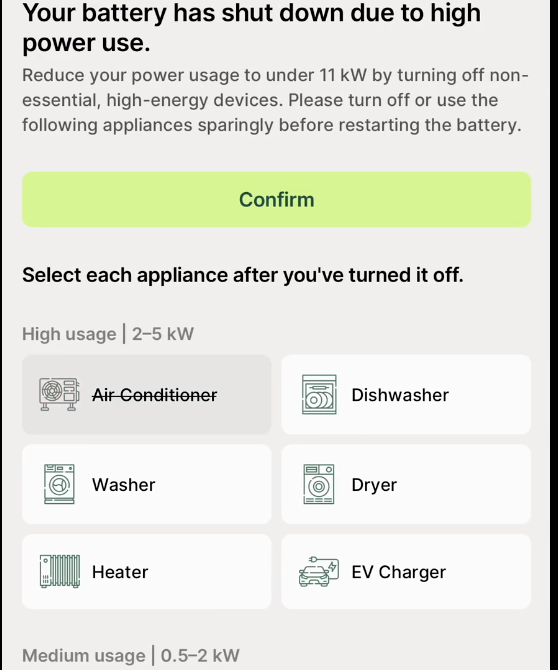
If it still doesn’t work after 3 automatic restarts, you'll need to cut energy use further. Once you've reduced usage, you can restart the battery using the Base Power mobile app.
Step 1: Click the "learn more" button in green
Step 2:
Select each appliance you have turned off, and then click the "confirm" button in green.
Doing this will restart your battery system.
If you have 2 batteries, once you decrease usage under 11 kW and the battery turns on, wait 5 minutes and then you can increase usage to 22 kW at that time. That said, we don't recommend using 22 kW as it will drain your battery more quickly.